Generative AI Lab 8.0 - Medical Terminology Coding and Built-In PDF Extraction for NER
Generative AI Lab 8.0 delivers a major advancement in healthcare annotation and document ingestion workflows, introducing native Medical Terminology support and built-in PDF text extraction for NER projects.
The headline feature is integrated Medical Terminology support, enabling automated code resolution and manual lookup across standards such as ICD-10, LOINC, SNOMED CT, CPT, and more directly within annotation workflows.
This release also introduces built-in PDF text extraction with structure preservation, allowing teams to process complex documents without relying on external licensed OCR server.
In addition, the Cluster Management dashboard has been redesigned to provide improved visibility into system resources and deployments, and the platform now runs on PostgreSQL 17.6 to deliver enhanced performance, stability, and long-term support.
Medical Terminology Automated Lookup with Pre-Annotation for Healthcare Projects
What’s New
Generative AI Lab 8.0 introduces Medical Terminologies as a core platform capability, enabling standardized clinical annotation using widely adopted coding systems such as ICD-10, LOINC, CPT, SNOMED CT, RxNorm, and MeSH.
This feature supports both:
- Automated code resolution during pre-annotation
- Manual terminology lookup during annotation and review
Together, these capabilities improve consistency, interoperability, and clinical data normalization across healthcare projects.
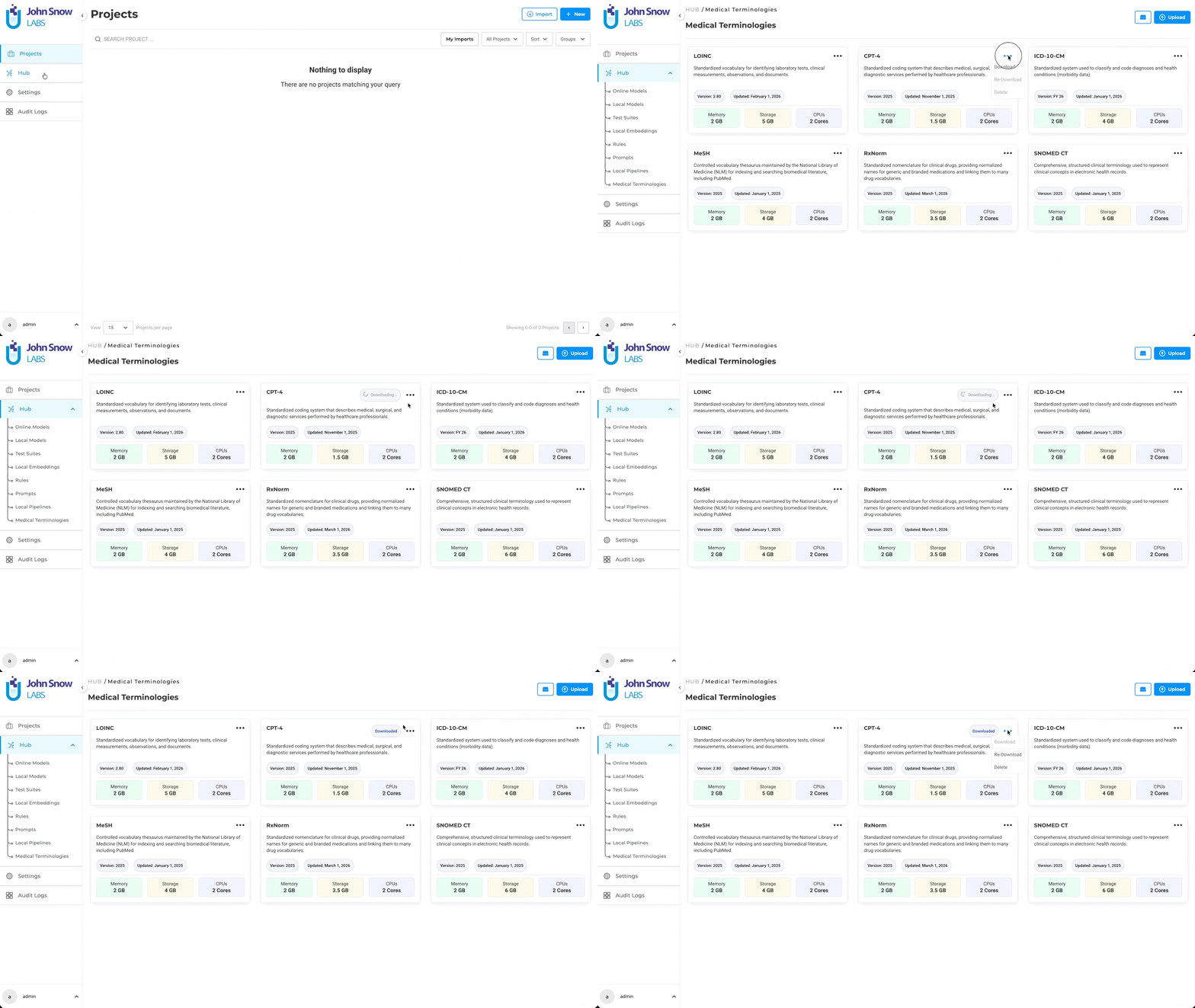
A dedicated Medical Terminologies management page has been added to the Hub, allowing users to browse, download, redownload, and delete terminology assets from a centralized location. Terminologies are integrated into project configuration, label mapping, and deployment workflows.
Once downloaded, a terminology becomes a shared resource that can be reused across multiple projects. The Label Configuration interface now supports mapping labels to specific medical terminologies, while the Cluster Management page displays terminology server status, CPU, memory, and deployed terminology sets.
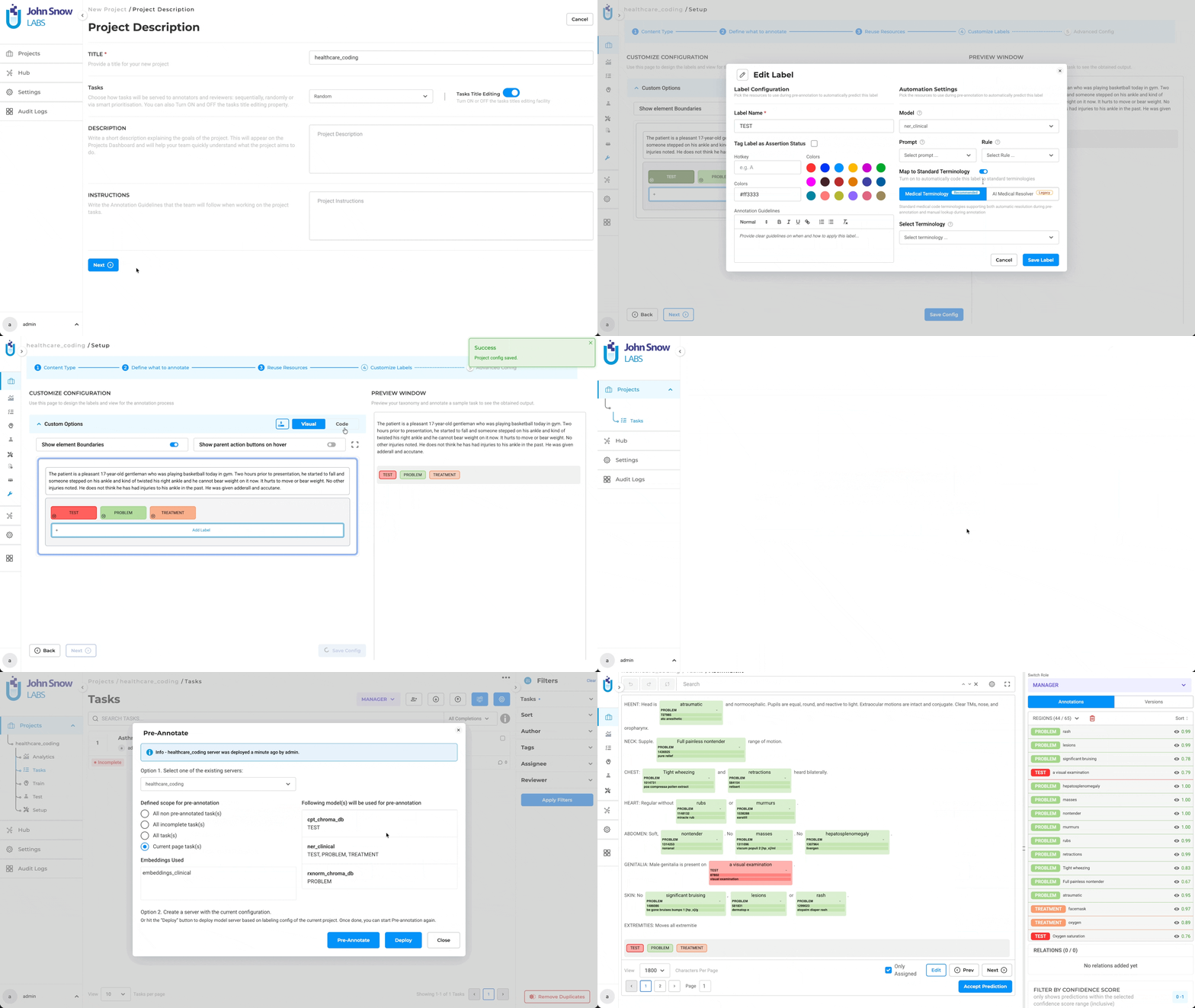
Steps to Use Medical Terminologies
- Download the required terminology assets from the Hub page
- Create a new project
- Navigate to Configuration → Reuse Resource → Customize Label
- Enable the toggle switch and add Medical Terminologies
- Navigate to the Task page
- Click the Pre-Annotate button
- Select Create Server from the dropdown
- Click Deploy
Technical Details
Medical Terminologies are introduced as a new reusable asset type across the Hub, project configuration, and cluster deployment workflows. The feature is designed to integrate seamlessly with existing healthcare annotation pipelines, allowing terminology resolution to be added without disrupting standard project setup or annotation workflows.
- Terminology Asset Management: Medical Terminologies are available as a dedicated asset type in the Hub, where users can explore terminology details and manage downloads, re-downloads, and deletion of terminology assets.
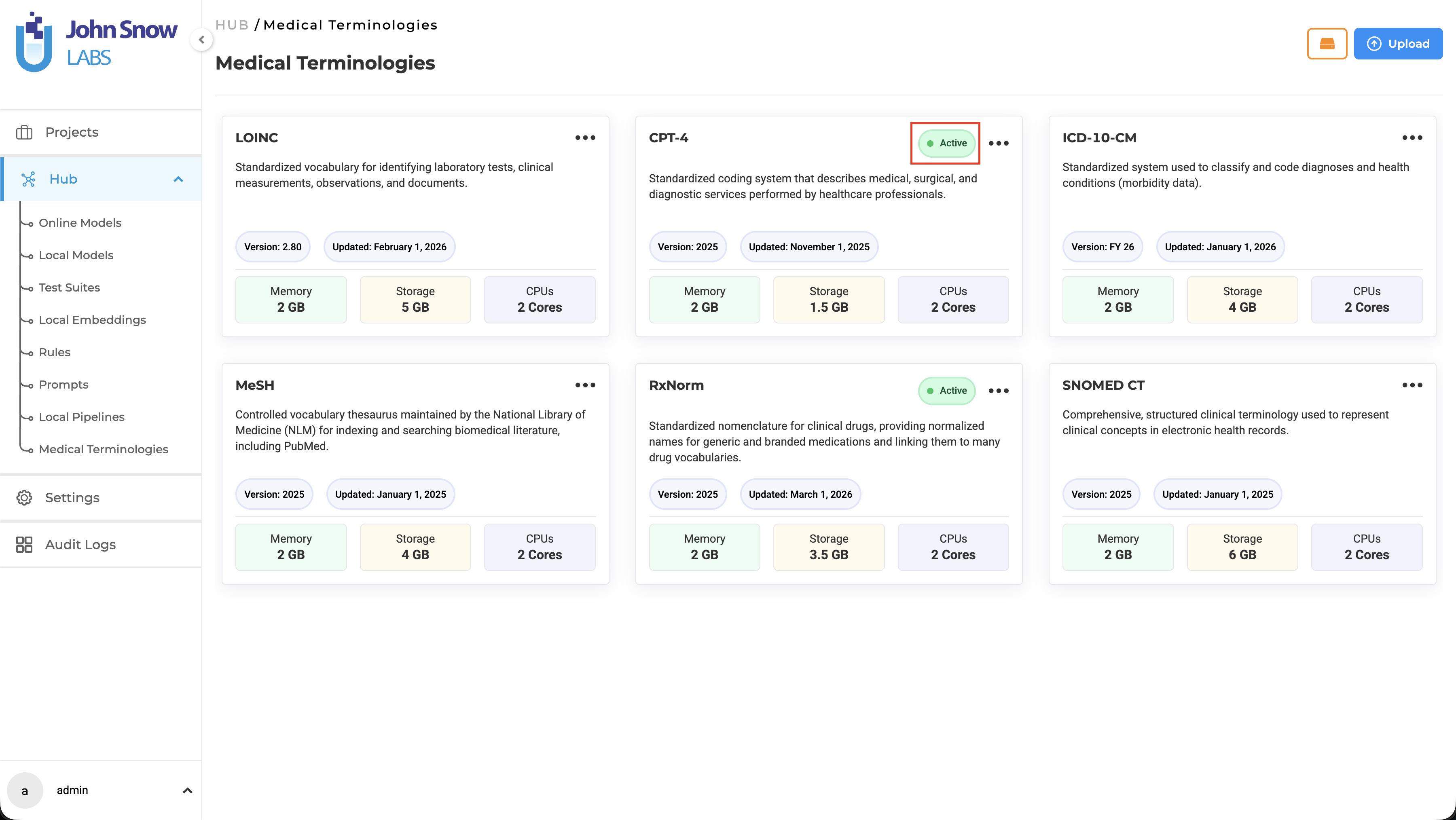
Note: If a terminology is deployed, an Active status is displayed on the corresponding Medical Terminology card.
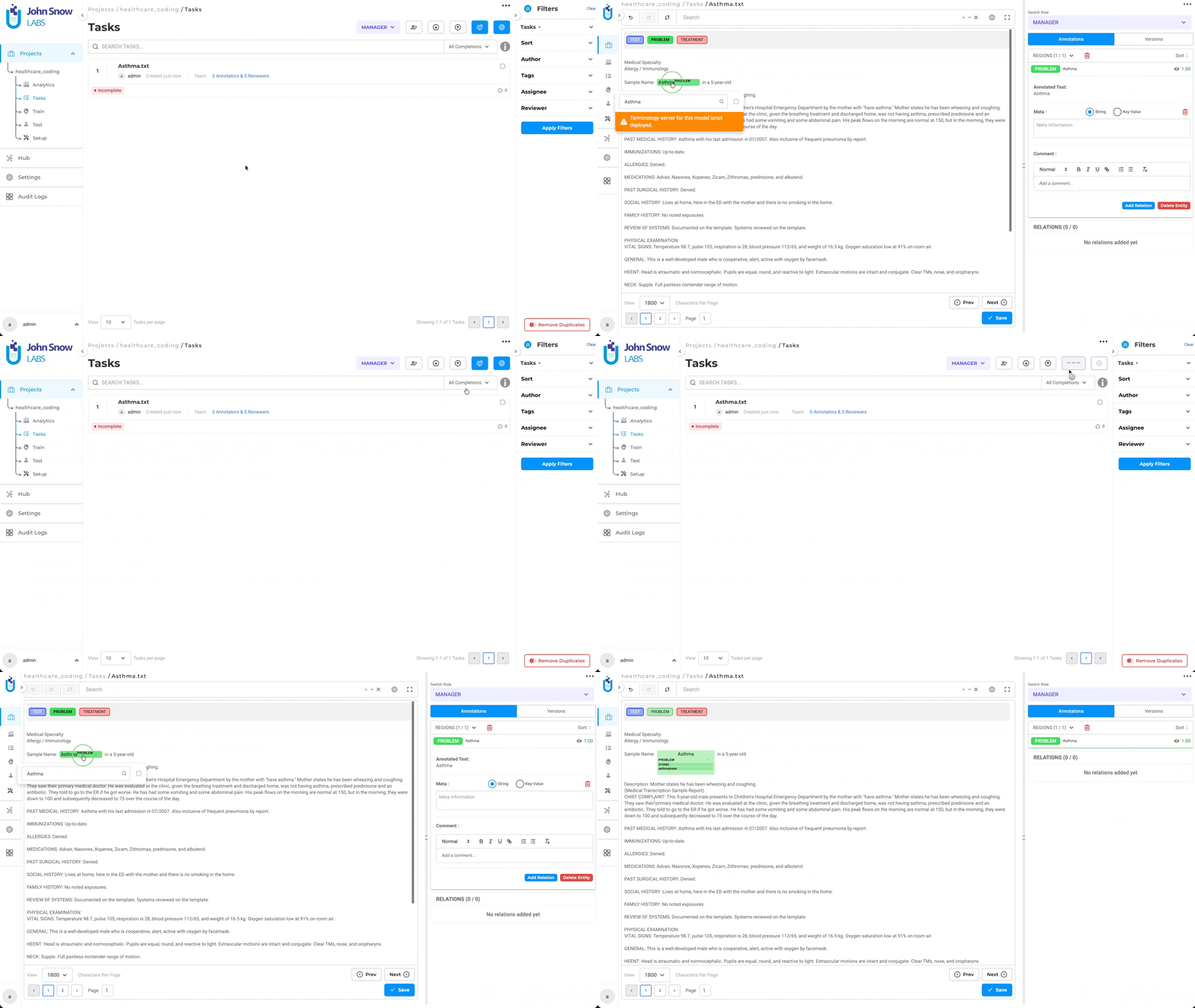
- Deployment: A new Deploy Medical Terminology Server button has been added to the Task page, allowing users to deploy a standalone Medical Terminology Server based on the project configuration. This deployment is required for users to perform manual terminology lookup during annotation. Note: - If the Deploy and Save Configuration button is used while saving configuration that includes Medical Terminologies, only the Pre-Annotation Server is deployed - If deployment is initiated through the Pre-Annotate button on the Task page, both the Medical Terminology Server and the Pre-Annotation Server are deployed
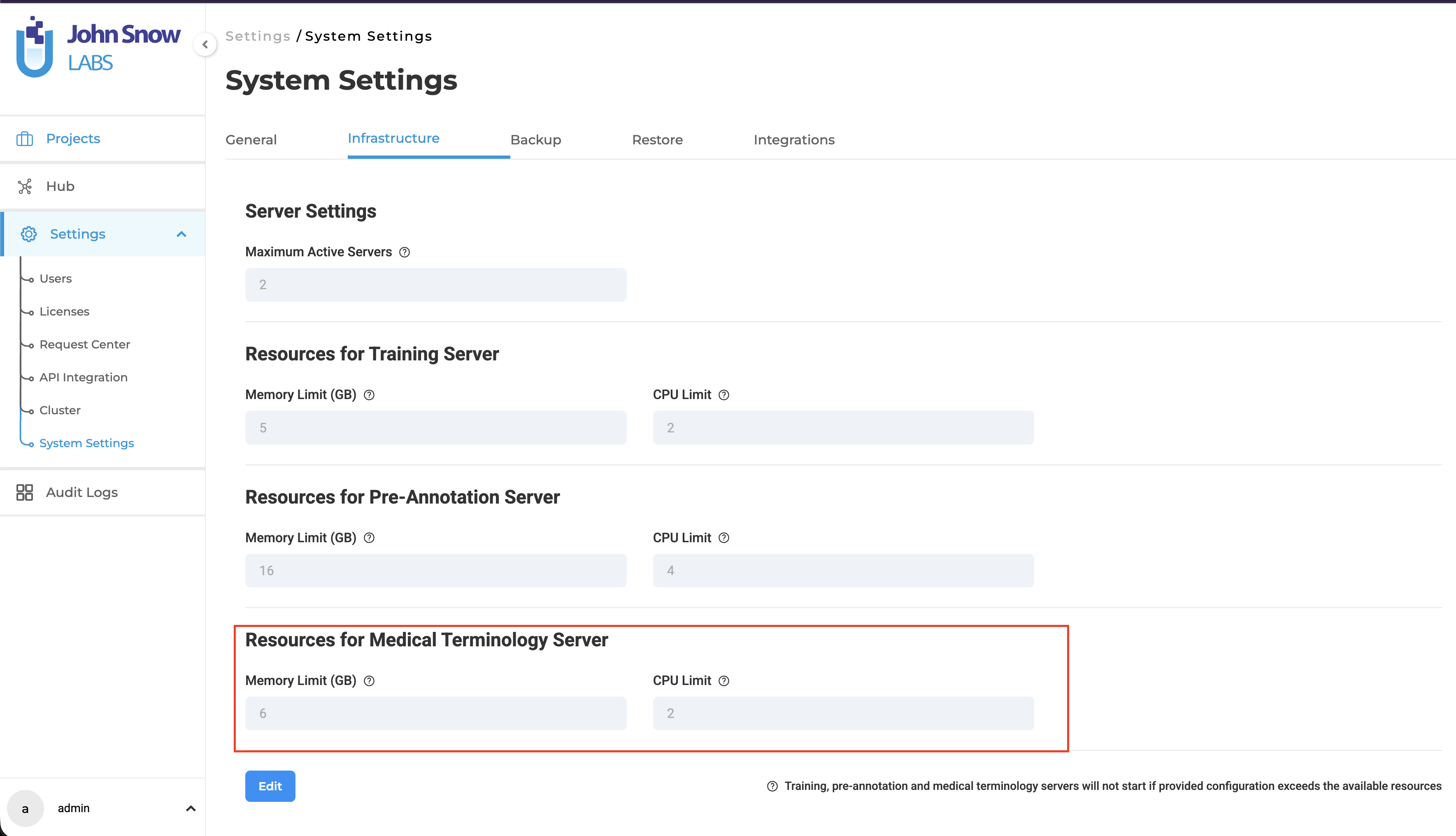
- Resource Management: A new form section has been added to the Infrastructure page for configuring resources for the Medical Terminology Server. This allows users to customize the CPU and memory allocation for the resolver server based on their requirements.
Note: By default, the Medical Terminology Server is configured with 2 CPU cores and 6 GB memory.
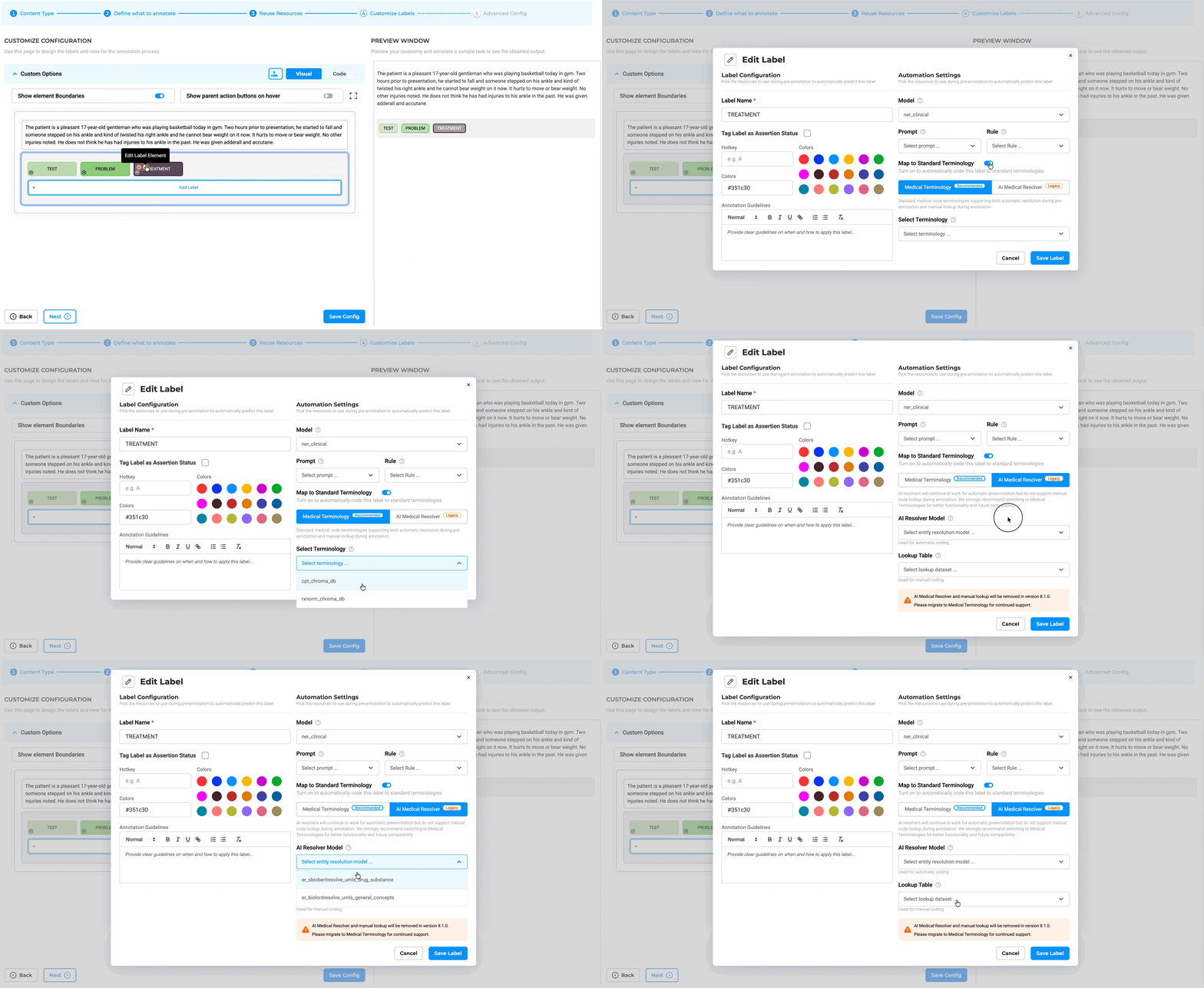
- Redesigned Label Configuration: The Customize Label Configuration interface has been redesigned, and a new toggle switch has been added to support Map Standard configuration for Medical Terminologies.
Note: Legacy resolver models have been moved to the AI Resolver Model tab.
-
Configuration Validation: Adding legacy resolver pipelines or legacy resolver models is blocked when a Medical Terminology is configured, and vice versa, preventing conflicting resolver setups and ensuring consistent entity resolution. Note: If attempted, the system blocks the action and displays a message indicating that Medical Terminology and AI Medical Resolver cannot be used together.
-
Project Configuration: Projects can link one or more terminologies through Customize Label Configuration, with label-level mapping to support targeted terminology usage.
-
Resolution Support: Linked terminologies can be used for automatic code resolution during pre-annotation and for manual lookup during annotation and review workflows.
-
Unified Deployment: If a project links to multiple terminologies, the system deploys them together on a single terminology server to optimize infrastructure usage.
-
Server Reuse Logic: A project can reuse an existing active terminology server if it requires the exact same set or a subset of the terminologies already deployed on that server.
-
Licensing & Credits: Downloading and deploying terminologies requires a valid license. Standalone terminology deployments consume 2 floating credits, while terminology servers deployed alongside an NER pipeline within the same project do not consume additional floating credits.
User Benefits
-
Clinical Standardization: Apply recognized healthcare coding systems directly within annotation workflows for consistent structured outputs
-
Improved Annotation Accuracy: Reduce coding inconsistency by enabling automated resolution and guided manual lookup
-
Reusable Shared Assets: Download terminology resources once and reuse them across multiple projects
-
Efficient Infrastructure Usage: Consolidate multiple terminologies into a single server and reuse existing active deployments where possible
-
Predictable Credit Consumption: Clear distinction between standalone terminology deployments and zero-cost parallel deployments with NER pipelines
-
Better Interoperability: Generate outputs aligned with standardized clinical coding systems for downstream healthcare analytics and integrations
Example Use Case
A healthcare annotation team is building a project to label diagnoses and laboratory findings from patient records:
- Download ICD-10 and LOINC terminology assets from the Hub
- Link ICD-10 to diagnosis labels and LOINC to lab-related labels in Customize Label Configuration
- Use automatic code resolution during pre-annotation to assign standard medical codes
- Allow annotators to manually look up alternative codes during review when needed
- Deploy both terminologies together on a single terminology server
- Reuse the same server for other projects that require the same or a subset of those terminologies
- If the project also includes an NER pipeline, the terminology deployment runs alongside it without consuming additional floating credits
This workflow improves consistency, reduces manual effort, and ensures clinical annotations remain aligned with standardized healthcare terminologies.
Free PDF Text Extraction with Structure Preservation for NER projects
What’s New
Version 8.0 introduces a new OCR and document ingestion backend for NER text-based projects. This enhancement significantly improves how PDF documents and image-based files are processed, resulting in more stable text extraction and better preservation of document structure for annotation.
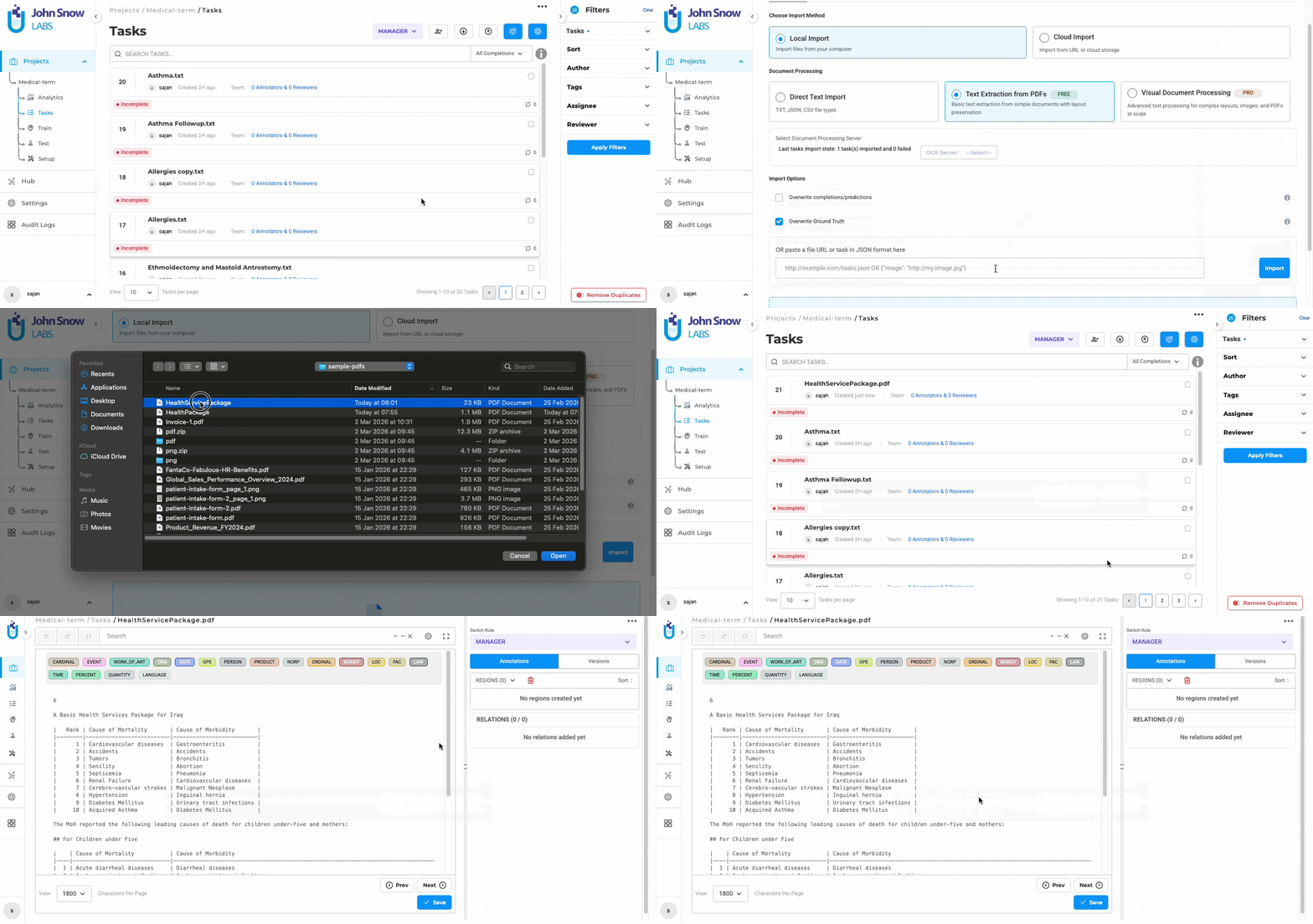
As part of this update, the Import experience has also been redesigned with a clearer interface and a built-in option for extracting text directly from PDFs without requiring a separate OCR server deployment in NER-based projects.
Technical Details
-
Out-of-the-Box OCR and Intelligent Document Parsing Text extraction from PDFs, scanned documents, and image-based files is now built into the platform, no external tools or additional setup required. The extracted text is optimized for stability and consistency, making it ready for NER annotation workflows straight away.
-
Improved Layout and Reading Order Preservation The ingestion process preserves document structure more effectively, maintaining logical reading order, paragraph boundaries, headings, and sections where possible. This minimizes issues such as broken lines, misplaced text, or excessive whitespace.
-
Seamless Mapping to NER Task Schema Extracted content is automatically converted into the existing NER text task format. Relevant metadata, such as source file references and page-level markers (when available), are retained for traceability without impacting the annotation workflow.
-
Integrated Import Page Redesign The Import page has been updated with improved layout, larger components, and clearer structure for better usability. A new option, “Text Extraction from PDFs (free)”, allows users to directly extract text from PDFs and certain image formats without deploying an external licensed OCR server. The overall import workflow remains unchanged.
-
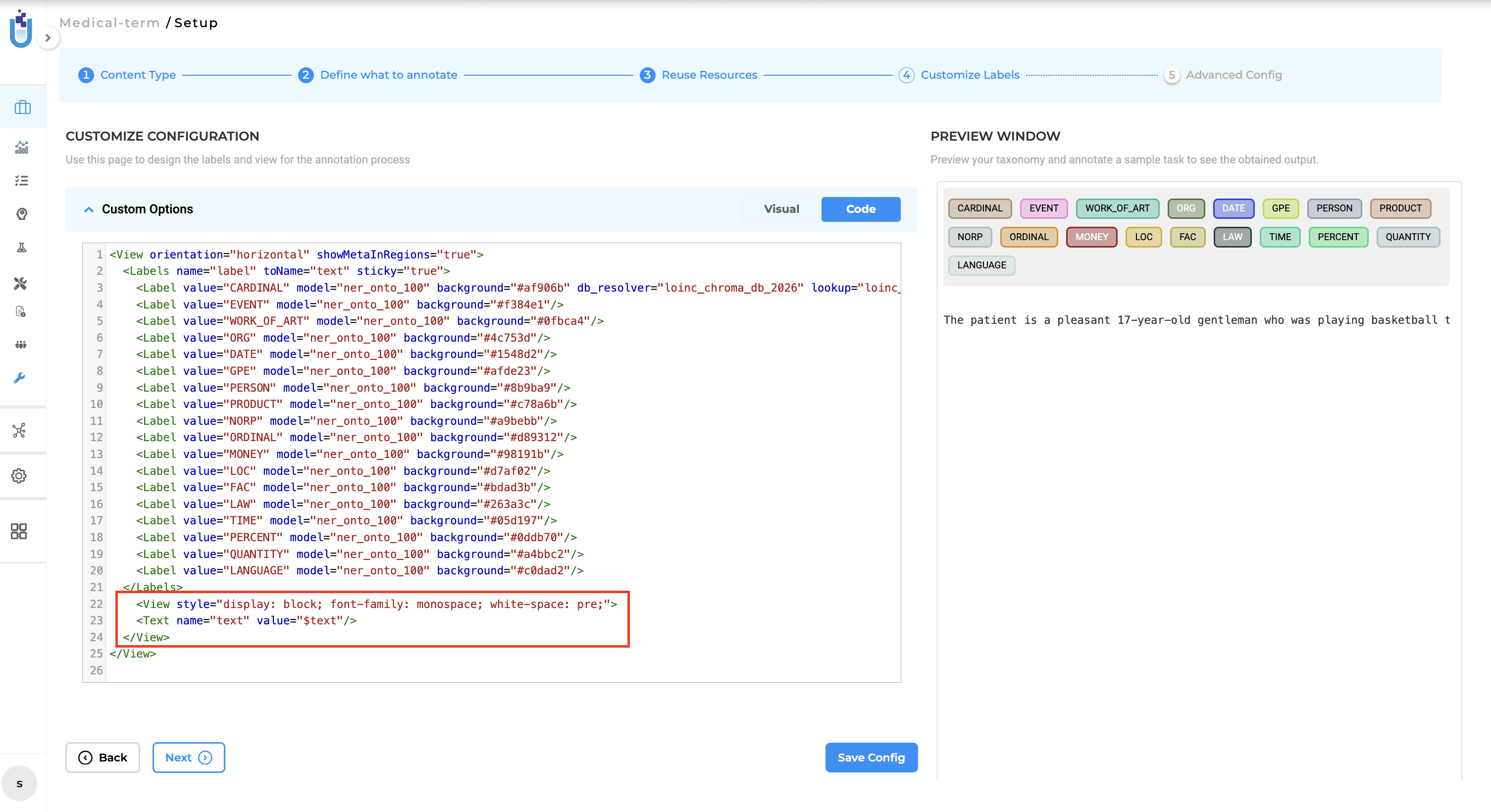
Configuration Requirement for Text Rendering To support the improved text formatting, the project configuration must include the following XML setup. Users must replace the existing
tag with the following: <View style="display: block; font-family: monospace; white-space: pre;"> <Text name="text" value="$text"/> </View>
Scope Limitation: This feature is currently available only for text-based NER projects.
User Benefits
- Improved text extraction for complex PDFs, especially those with structured layouts such as reports, tables, forms, and multi-section documents
- Better preservation of document flow, making it easier to understand context during NER annotation
- More stable and consistent outputs, reducing variability across repeated imports
- Reduced formatting issues, including broken lines and misplaced text
- Simplified import experience, with a clearer UI and built-in PDF text extraction
- Seamless integration with existing workflows, with no changes required in annotation or project setup
Flexible OCR strategy for different use cases
Out-of-the-box text extraction handles standard PDF workflows reliably with no additional setup. For teams that need higher precision, such as domain-specific documents, complex layouts, or strict accuracy requirements, advanced OCR capabilities from John Snow Labs are available as a seamless upgrade. This gives teams the flexibility to start simple and scale up to enterprise-grade accuracy when needed.
Example Use Case
A user imports a collection of PDF documents containing structured reports with headings, sections, and detailed content. Using the redesigned Import page, the user selects the “Text Extraction from PDFs (free)” option and uploads the documents.
The built-in ingestion engine extracts text, preserves the original reading order and structure, allowing the user to clearly interpret context during NER annotation. The improved layout and stability of the text reduce the need to refer back to the original PDF, enabling faster and more accurate annotation across complex documents.
Improvements
Cluster Management Dashboard Redesign
What’s Improved
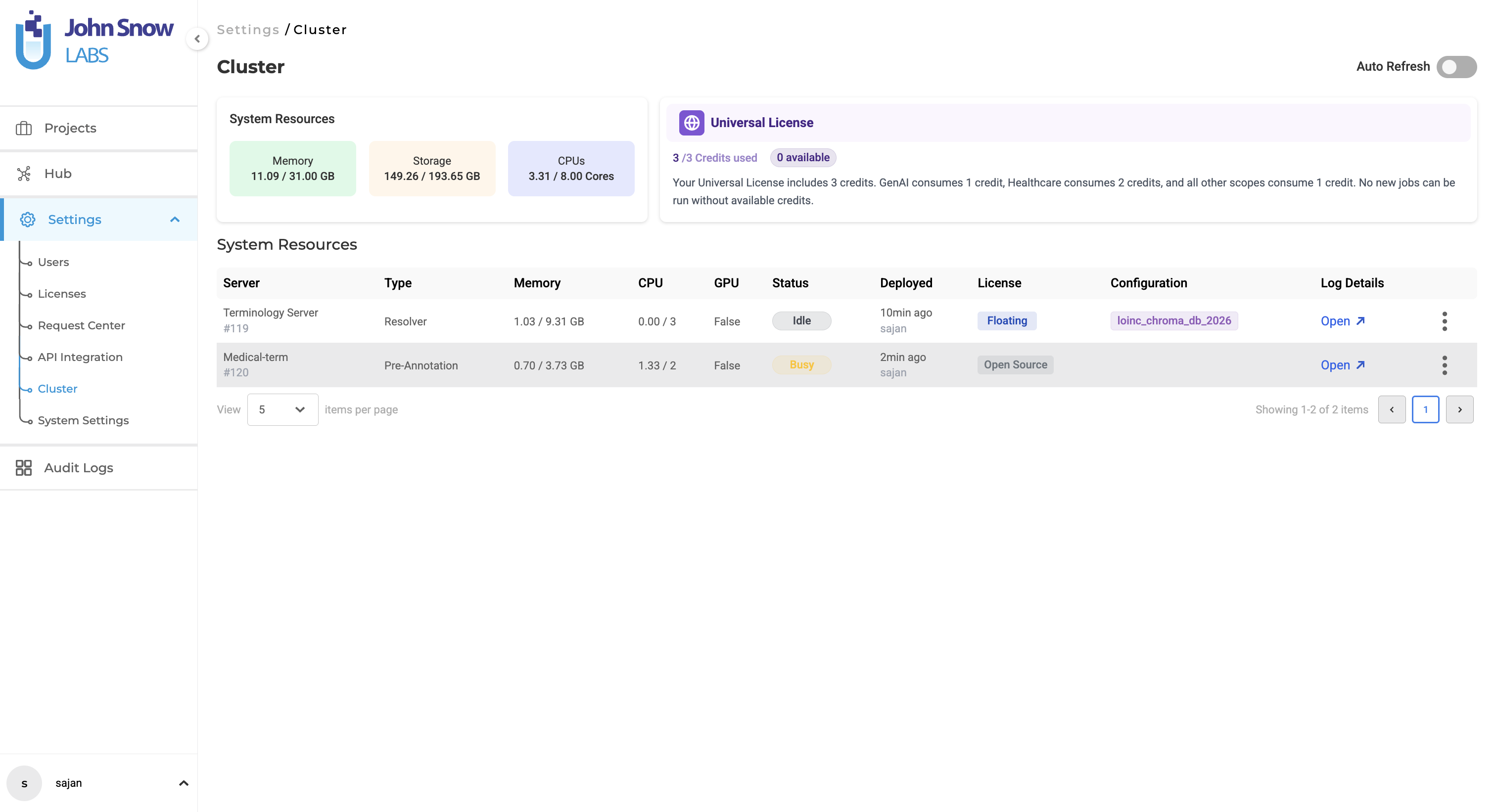
Version 8.0 introduces a redesigned Cluster Management Dashboard, delivering improved visibility into system resources, deployed servers, and medical terminologies. The updated interface enables administrators and project managers to monitor system health, understand resource allocation, and manage deployments more effectively.
Technical Details
-
System Resource Summary (New) A resource summary section is now available at the top of the Cluster page, displaying real-time usage of Memory, CPU, and Storage. Each resource is presented through visual cards showing consumed versus total capacity, dynamically calculated across all active server deployments.
- Enhanced License Information Banner
The license banner has been updated to provide clearer and more contextual information based on license type:
- Airgap License: No fixed limit on deployments; constrained only by available system resources
- Floating License: Displays concurrent job slots with real-time usage and availability
- Universal License: Displays credit-based usage with a clear indication of consumed and available credits
This improves transparency around system limits and usage behavior.
Note: The license usage metrics displayed on the Cluster page (including credits for Universal License and slots for Floating License) reflect only the servers deployed within the current instance. Usage from other instances is not included and may not represent total consumption across environments.
-
Detailed Server Resource Allocation Each server entry now includes explicit resource allocation details, including assigned memory, CPU cores, and storage. This provides better visibility into how resources are distributed across deployments.
-
Visual Server Type Identification Servers are clearly categorized and distinguished between Pre-Annotation / OCR and Medical Terminology deployments, enabling quick identification of server types.
- Configuration Visibility with Inline Tags (New)
Server configurations are displayed directly within the table using structured tags in the Configuration column:
- Pre-annotation servers display models, rules, and prompts
- Medical terminology servers display deployed terminologies (e.g., ICD-10, LOINC, CPT) Tags are styled for clarity and wrap across multiple lines as needed.
-
Improved Server Status and Metadata Each server row now includes enhanced metadata, such as CPU usage, Memory usage, Configuration, deployment time, deployed user, license type, and real-time status indicators. Status markers provide quick insight into whether a server is busy(actively running), idle, pending, or stopped.
- Actionable Controls Users can directly access server logs or remove deployments through clearly visible action buttons, reducing the need for additional navigation.
User Benefits
- At-a-glance system health monitoring, with clear visibility into memory, CPU, and storage usage
- Improved capacity planning, supported by real-time resource tracking and visual indicators
- Better decision-making, with detailed insights into how resources are allocated across servers
- Clear visibility into deployed assets, including models, rules, and medical terminologies
- Reduced risk of resource exhaustion, through proactive usage indicators
- More efficient cluster management, with all critical information accessible in a single view
Example Use Case
An administrator managing multiple deployments opens the Cluster page to review system usage. The resource summary highlights that memory consumption is approaching capacity. By reviewing the server table, the administrator identifies which deployments are consuming the most resources, including specific models and medical terminologies in use. Based on this insight, the administrator can scale resources, remove unused servers, or delay new deployments to maintain system performance and stability.
Upgraded Postgres
What’s Improved
Version 8.0 upgrades the underlying database engine to PostgreSQL 17.6, improving performance, reliability, and long-term support. This is a backend enhancement with no impact on installation, upgrade workflows, or existing application behavior.
Technical Details
- The underlying database engine has been upgraded to PostgreSQL 17.6.
- The upgrade is fully backward compatible with existing schemas and data.
- No changes are required during installation or upgrade.
- Application behavior, APIs, and workflows remain unchanged.
Advantages of the Upgrade
-
Improved Performance PostgreSQL 17 introduces optimizations in query execution, indexing, and memory handling, enabling faster processing of large datasets and complex queries.
-
Better Resource Utilization Enhancements in CPU and memory management help improve overall system efficiency, particularly in high-load environments.
-
Enhanced Stability and Reliability Includes multiple stability improvements and bug fixes, reducing the likelihood of database-related issues in production.
-
Stronger Security Posture Incorporates the latest security updates, improving protection of application data.
-
Long-Term Support and Compatibility Aligns the platform with a supported PostgreSQL version, ensuring continued compatibility and maintainability.
User Benefits
- Faster and more responsive system performance
- Improved stability for large-scale projects and concurrent workloads
- No disruption to existing workflows or configurations
- Increased confidence in data security and platform reliability
Selective Deployment for Medical Terminology Servers
What’s Improved
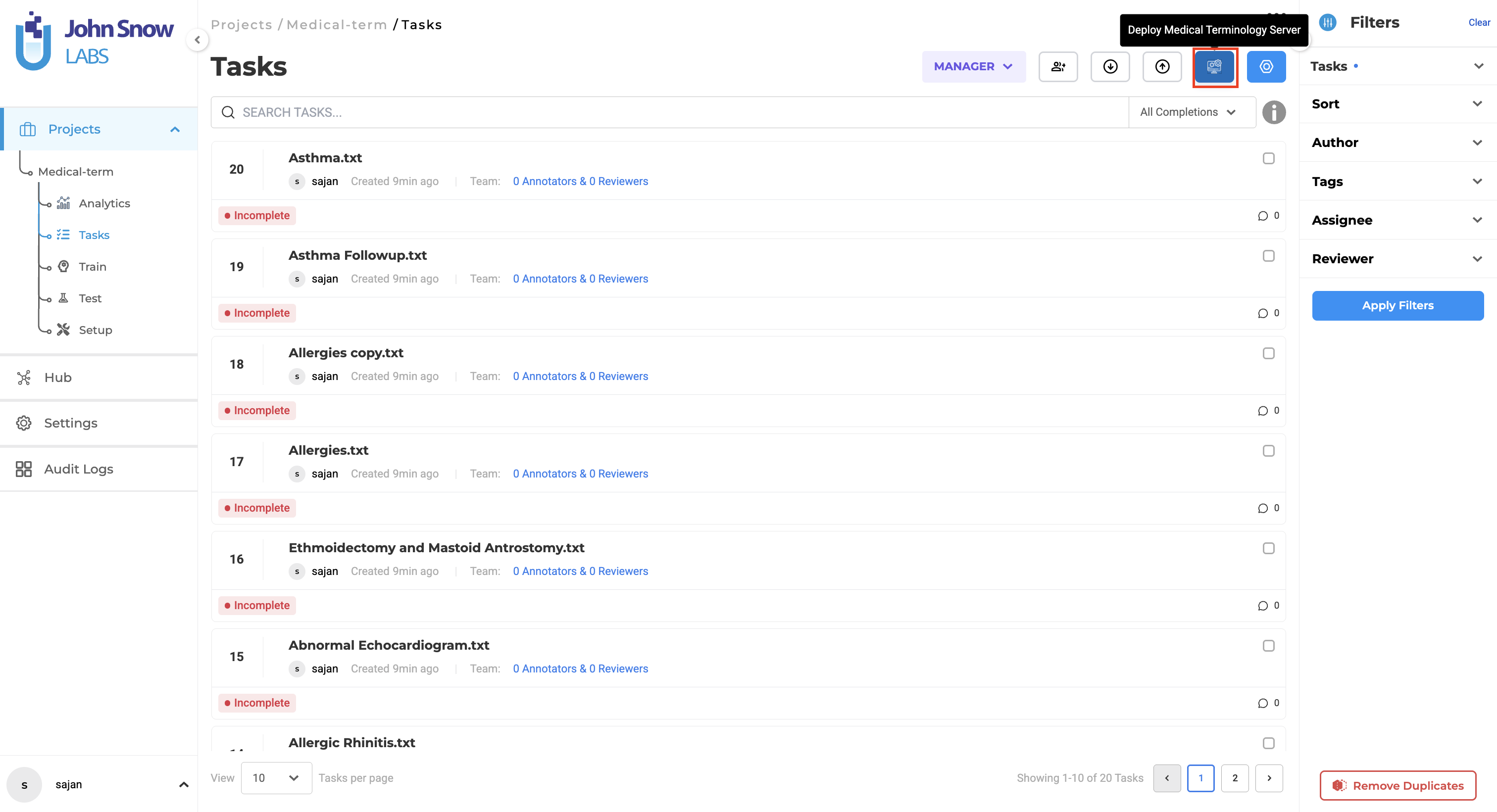
Version 8.0 introduces the ability to deploy Medical Terminologiesservers independently for projects configured with medical terminologies. A dedicated action button is now available alongside the existing Pre-Annotate option, enabling more flexible deployment based on project requirements..
Technical Details
- A new action button is displayed when a project includes both labels and Medical Terminologies.
- The button is positioned next to the Pre-Annotate button in Task page for easy access.
- Enables deployment of the Medical Terminology server without initiating a pre-annotation server.
- The deployed terminology server can be used directly during manual annotation workflows.
- Existing annotation workflows and project configuration logic remain unchanged.
User Benefits
- Faster setup for terminology-based workflows, without requiring pre-annotation server deployment
- Reduced resource consumption, by deploying only the required server
- Improved efficiency for manual annotation, with immediate access to terminology support
- Greater flexibility, allowing users to choose deployment based on project needs
- No disruption to existing annotation workflows, ensuring a seamless transition
Example Use Case
A user working on a medical annotation project needs access to standardized terminologies such as ICD or SNOMED during manual labeling. Instead of deploying both pre-annotation and terminology servers, the user deploys only the Medical Terminology server using the new button. This reduces setup time and resource usage while still providing the necessary support for accurate annotation.
Bug Fixes
-
Discrepancy in Regions When Multiple Models are added to a Project
Inconsistent display of annotated regions could occur when multiple models were used within a project. Region listing has been corrected, and all annotated regions are now shown with accurate counts in the Regions section.
-
Import Button is Not Clickable During Document Import
During ongoing document imports, the Import button could become non-interactive. Button behavior has been improved to remain responsive, with a loading indicator providing clear feedback during the import process.
-
Pre-Annotate Button is Not Showing Loading State in Real-Time After Re-Deployment
The Pre-Annotate button did not immediately reflect a loading state after re-deploying the pre-annotation server. UI feedback has been updated so the button now transitions instantly to a loading state, clearly indicating that deployment is in progress.
-
Annotation Discrepancy with “Label All Occurrence” Enabled in Side-by-Side Projects
Annotation inconsistencies could occur when the Label All Occurrence option was enabled in Side-by-Side projects. Annotation behavior has been corrected to ensure consistent application across multi-page documents.
-
Deployed Models Not Available for Pre-Annotation in Image Text Side-by-Side Projects
In some cases, successfully deployed models were not visible in the Pre-Annotation section for Image Text Side-by-Side projects. Model availability has been corrected, and deployed models now appear as expected for pre-annotation workflows.
-
Pre-Annotation Server Not Auto-Deploying After Training Completion
The pre-annotation server could remain in a stopped state after training completion instead of deploying automatically. Deployment behavior has been corrected, ensuring the server starts successfully and models are available for immediate use.
-
Lookup Dropdown was Displayed in Pre-Annotation Completions
The lookup dropdown could appear in pre-annotation (predicted) completions, allowing unintended interaction. UI behavior has been corrected, and the dropdown is no longer displayed for predicted completions.
Versions
- 8.3.0
- 8.2.8
- 8.2.6
- 8.2.5
- 8.2.1
- 8.2.0
- 8.1.3
- 8.1.2
- 8.1.1
- 8.1.0
- 8.0.1
- 8.0.0
- 7.8.2
- 7.8.1
- 7.8
- 7.7
- 7.6.0
- 7.5.1
- 7.5.0
- 7.4.0
- 7.3.1
- 7.3.0
- 7.2.2
- 7.2.1
- 7.2.0
- 7.1.0
- 7.0.1
- 7.0.0
- 6.11.3
- 6.11.2
- 6.11.1
- 6.11.0
- 6.10.1
- 6.10.0
- 6.9.1
- 6.9.0
- 6.8.1
- 6.8.0
- 6.7.2
- 6.7.0
- 6.6.0
- 6.5.1
- 6.5.0
- 6.4.1
- 6.4.0
- 6.3.2
- 6.3.0
- 6.2.1
- 6.2.0
- 6.1.2
- 6.1.1
- 6.1.0
- 6.0.2
- 6.0.0
- 5.9.3
- 5.9.2
- 5.9.1
- 5.9.0
- 5.8.1
- 5.8.0
- 5.7.1
- 5.7.0
- 5.6.2
- 5.6.1
- 5.6.0
- 5.5.3
- 5.5.2
- 5.5.1
- 5.5.0
- 5.4.1
- 5.3.2
- 5.2.3
- 5.2.2
- 5.1.1
- 5.1.0