Search Articles
Every project starts here. The Search step lets you query multiple medical and academic sources at the same time, narrow down the result set with rich filters, and automatically expand your query with medical terminology — before a single article gets sent to the LLM for extraction.
Search Sources
| Source | Type | Notes |
|---|---|---|
| DeepLens medical knowledge bases | Medical | Primary medical search; semantic and keyword modes |
| PubMed (NCBI) | Academic | Requires NCBI API key for high-volume use |
| Semantic Scholar | Academic | 200 M+ papers across all disciplines |
| Europe PMC | Academic | Life-sciences literature and preprints |
| OpenAlex | Academic | 250 M+ scholarly works, open access |
| Custom uploads | Custom | ZIP of documents or an S3 prefix |
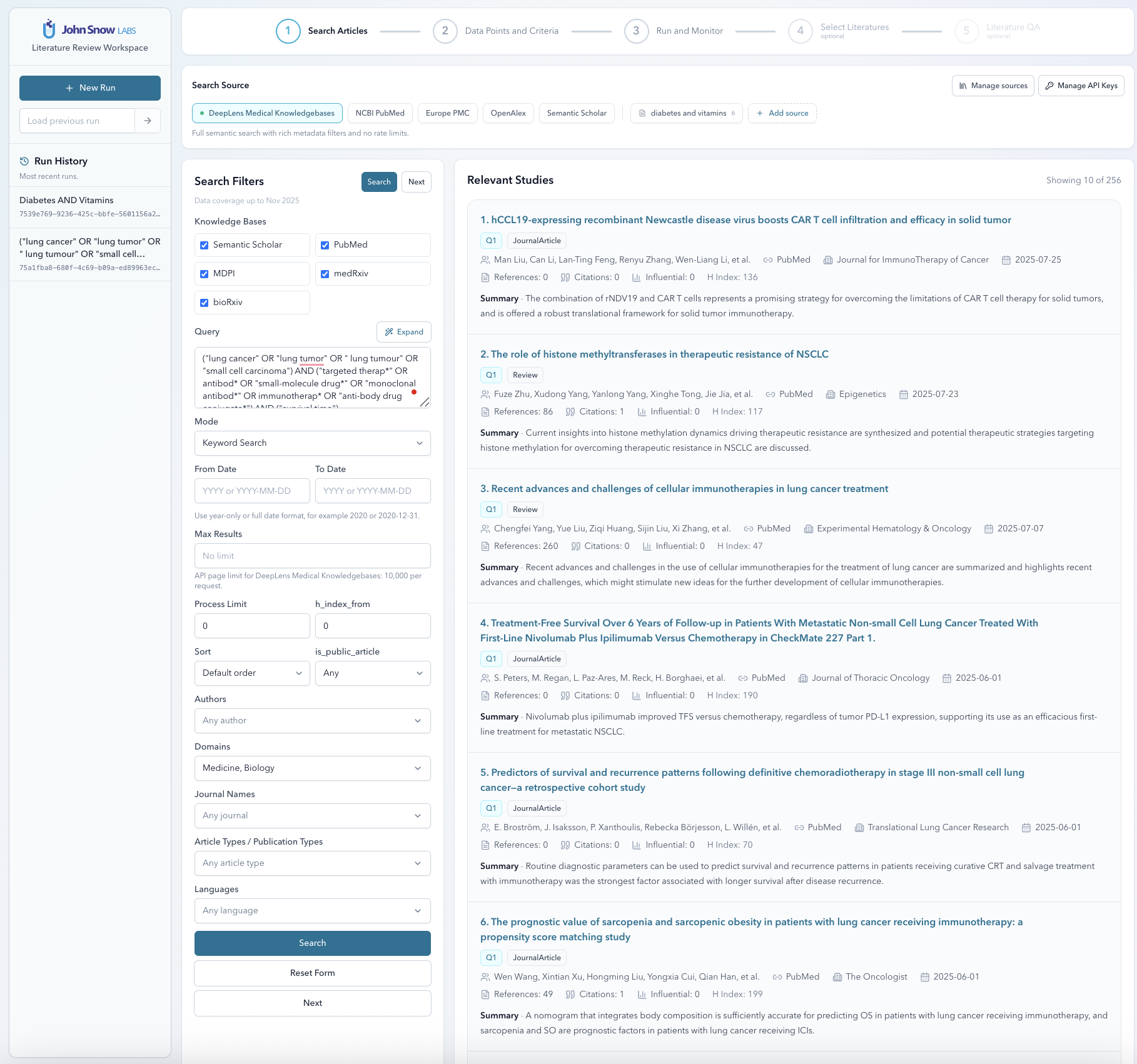
Search Modes
There are three search modes, and you can mix and match them within the same project:
- Keyword search — Boolean term matching against title, abstract, and metadata fields. Good when you know exactly what terms you’re looking for.
- Semantic search — Embedding-based similarity search. It finds conceptually related papers even when they don’t use your exact phrasing, which is particularly useful in medical literature where terminology varies a lot.
- Document-ID search — Fetch specific articles by PubMed ID, DOI, or internal identifier. Handy when you already have a list of known studies to include.
You don’t have to pick just one. A common pattern is to run a semantic search to discover related papers and a document-ID lookup to pull in specific studies you already know belong in the review.
MeSH Query Expansion
PubMed and DeepLens knowledge bases index papers using MeSH (Medical Subject Headings) — a controlled vocabulary that doesn’t always match the free-text terms in an abstract. If you search for “heart attack”, you might miss papers indexed under “myocardial infarction”.
Literature Review Agent can automatically expand your query with MeSH terms to close that gap. Turn it on from the search options panel before running your search.
Filters
It’s worth spending a minute on filters before you kick off extraction. A well-filtered result set means less noise in your results and fewer LLM calls — both of which matter when you’re processing hundreds of papers.
| Filter category | Options |
|---|---|
| Date | Date range (from / to) |
| Publication type | Journal article, review, clinical trial, case report, meta-analysis, etc. |
| Language | English, French, German, Spanish, and more |
| Journal | Journal name or ISSN |
| Author | Author name or ORCID |
| Open access | Open-access only toggle |
| Quality signals | Impact factor, journal quartile (Q1–Q4), h-index, citation count |
Custom Document Sources
Not everything you need is in a public database. If you’re working with proprietary clinical study reports, internal research memos, or any other private corpus, you can bring those documents in as a custom source.
- ZIP upload — Upload a ZIP archive containing
.pdf,.txt, or.docxfiles. The appliance ingests, extracts text, and indexes them for both keyword and semantic search. - S3 prefix — Point the appliance at an S3 bucket prefix; the worker downloads and ingests everything it finds there.
Once ingested, custom sources show up as selectable search targets alongside the built-in databases. Manage them from the Custom Sources section in the UI or via the API.