Run & Monitor
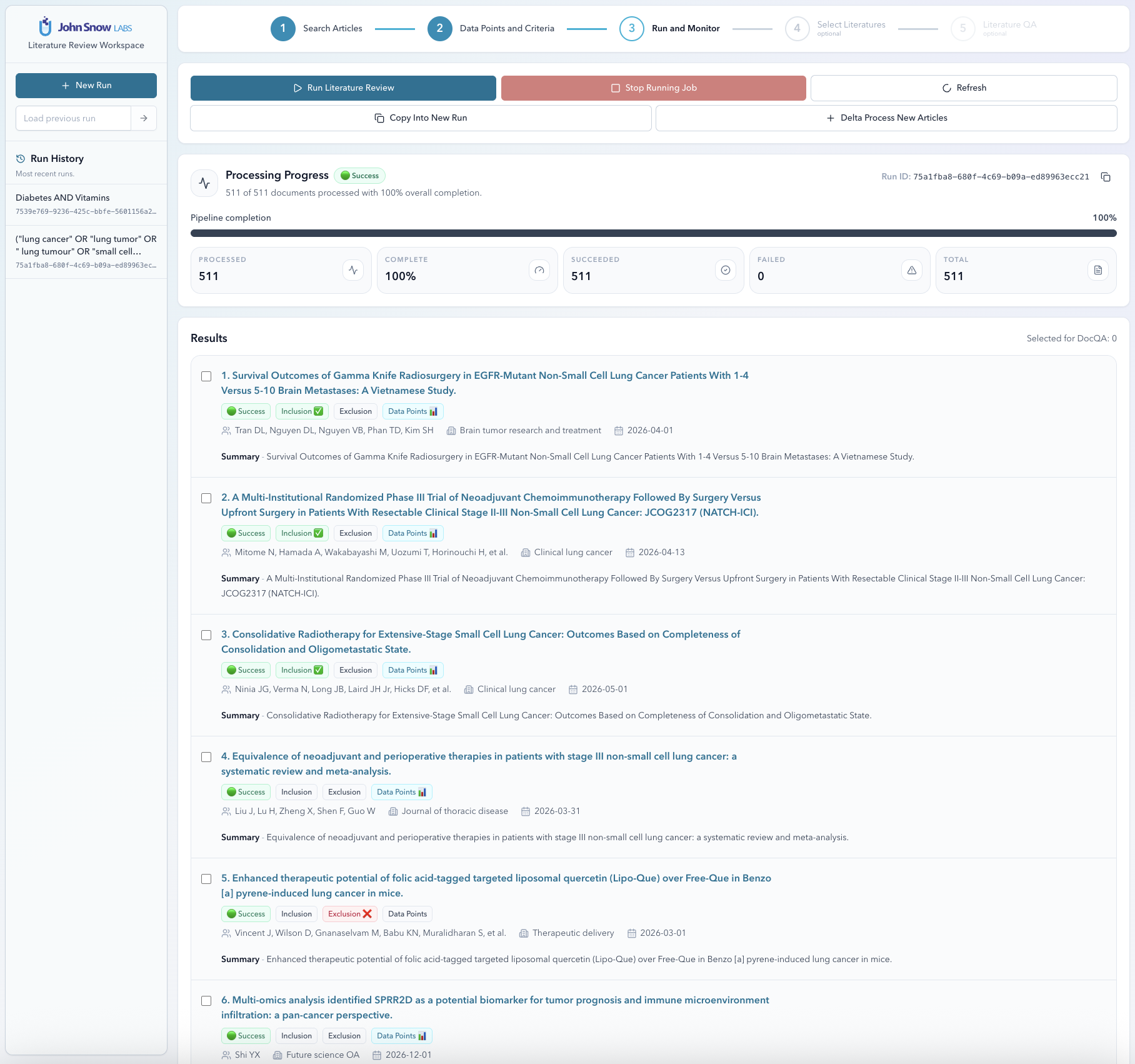
Once your search results and criteria are set, this is where you kick things off. Extraction runs in the background across distributed workers, so large result sets don’t block the UI — you can close the tab and come back later if you want. The monitor gives you live visibility into exactly where things stand.
Live Progress
The run monitor shows real-time counters that update as articles are processed:
| Counter | Description |
|---|---|
| Total | Total articles queued for extraction |
| Processed | Articles attempted (succeeded + failed) |
| Succeeded | Articles extracted without error |
| Failed | Articles that encountered an extraction error |
| % Complete | processed / total × 100 |
Delta Processing
One of the more practical features: delta processing lets you add newly discovered articles to an existing run without touching what’s already been extracted. Run the same search next month, and only the new papers get processed.
This is especially useful for ongoing surveillance — monitoring a topic where new papers appear regularly. It’s also handy when you broaden a search query after an initial run and want to pick up the extra results without starting over.
To trigger a delta run, open the run history for a project and select Delta Update.
Copy into a New Run
Want to reuse a project setup for a different topic? Clone the run. It copies the search parameters, data points, and criteria into a fresh run that you can edit freely — the original stays untouched. It’s also a clean way to experiment with modified criteria without overwriting a run you already trust.
Run History
Every run is saved. The run-history sidebar lists all previous runs for a project — start time, status, and article counts at a glance. Switching between runs is a single click, so comparing results across different search configurations is easy.
CSV Export
When a run is complete, export the full result set as a CSV. The file is structured for immediate use in Excel, R, or any analysis tool — no post-processing needed.
Each row is one article. Columns include:
- All article metadata fields.
- One column per data point (the extracted value).
- One column per inclusion/exclusion rule (the verdict).
- The overall inclusion verdict.
- Evidence sentences for each extracted value.
Click Export CSV in the run monitor toolbar, or call GET /reports/{run_id}?format=CSV via the API.